Keep me signed in
When you sign in to your Alba Wildlife Cruises account you may see a “Keep me signed in” option. This page explains what that checkbox does, when it’s safe to use, and how to turn it off again.
What “Keep me signed in” does
Normally, you stay signed in only while your browser session is active. When you close your browser or your session expires, you will be asked to sign in again.
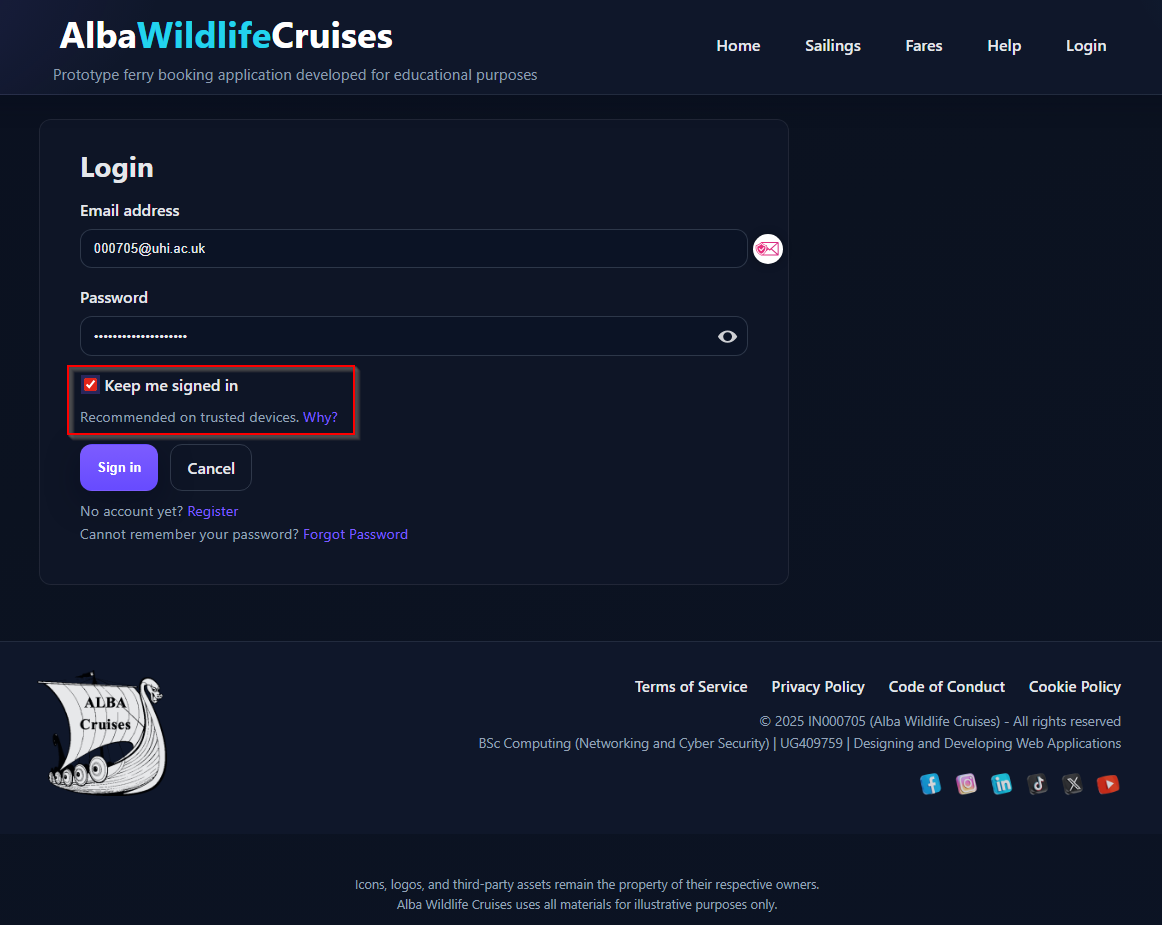
If you tick “Keep me signed in” on the login form, we set a longer-lived cookie in addition to the standard session cookie. This allows your browser to remember that you are a trusted user on that device for a limited period, so you do not have to enter your email and password every time.
When it’s safe to use
You should only use “Keep me signed in” on devices that you control and that are not shared with other people, for example:
- Your personal laptop or desktop computer.
- Your own mobile or tablet that is protected by a PIN, password, or biometrics.
- A device that you can lock and that nobody else regularly uses.
On these trusted devices, staying signed in can make everyday tasks faster and more convenient, for example:
- Checking upcoming sailings or bookings without re-entering your credentials.
- Accessing your boarding passes quickly before travelling.
- Managing your account details and loyalty status with fewer interruptions.
When you should not use it
Do not enable “Keep me signed in” on:
- Public computers (libraries, hotels, cafés, shared offices).
- Devices that belong to someone else.
- Shared family or work machines where others have access to your user profile.
If you tick the box on an untrusted device, the next person using that browser may be able to open your account without entering a password.
How long you stay signed in
The “Keep me signed in” option keeps you signed in for a limited time using a persistent cookie and a hashed recorded session in our database. Once the database session has expired (48-hours) the cookie that is stored by the browser will also expire. Alternatively if the cookie is deleted, or becomes invalid for any reason (e.g. you clear your browser cookies), you will be asked to sign in again regardless of the recorded session in the database.
We may also ask you to re-enter your password earlier in certain cases, for example when:
- You change your password or security settings.
- We detect unusual activity on your account.
- Our security policies are updated.
- You manually sign out.
How to turn it off
If you no longer want to stay signed in on a device, you have several options:
- Sign out using the “Log out” option in the navigation.
- Untick “Keep me signed in” next time you log in on that device.
- Clear cookies for albawildlifecruises in your browser settings. This removes the persistent “remember me” cookie and will delete the stored session in our database. After doing this, you will be asked to sign in again.
Security and good practice
- Protect your device with a password, PIN, or biometric lock.
- Do not share your account password with anyone.
- Sign out if you suspect that your device has been lost, stolen, or compromised.
- Consider using a password manager to generate and store strong passwords.
Cookies, privacy and your data
The “Keep me signed in” feature relies on a small, persistent cookie that allows your browser to recognise your account on future visits. Most modern browsers, such as Microsoft Edge, Mozilla Firefox, and Google Chrome, have cookies enabled by default, which means the cookie is stored locally in the browser without any additional setup.
Some privacy-focused browsers, including Brave and DuckDuckGo, use stricter defaults. These may block or clear cookies automatically unless you adjust their privacy settings. If cookies are not allowed, the “Keep me signed in” feature will not persist, and you will be asked to sign in again after each session.
Regardless of browser behaviour, a hashed session token is still created on our server whenever you sign in. This server-side session exists independently of any local browser cookie and will expire, and be securely deleted, automatically according to our session policies. If your browser blocks the persistent cookie, the session remains valid on our servers but your browser will not retain the information needed to stay signed in between visits.
For more detail on how we use cookies and session data, please see our Cookie Policy. To learn how we protect personal information, please review our Privacy Policy.
If you still have questions
If you are unsure whether you should enable “Keep me signed in” on a specific device, treat that device as untrusted and leave the box unticked. You can still use all booking and account features; you’ll simply be asked to sign in more often.
If you have any further questions about this feature or need help with your account security, please contact our support team.